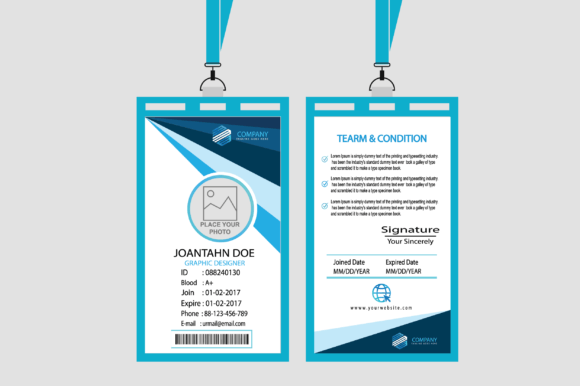
ID Card Design Template for School
Whether you're coordinating student IDs for a new academic year, rolling out staff badges for a growing charter school, or building branded access cards for a private academy’s summer camp program — the ID Card Design Template for School is built to handle it all, without requiring design expertise or expensive software subscriptions.
More Than Just a “School” Template — It’s a Brand-Ready Toolkit
Don’t let the name fool you: while this template shines in educational settings, its flexibility makes it equally powerful for corporate training centers, after-school enrichment agencies, tutoring networks, edtech startups, and even nonprofit youth development programs. Its dual-sided layout — front and back — supports real-world functionality: photo + name + grade on the front; emergency contact info, barcode space, QR code placeholder, or policy reminders on the reverse. That means one download solves multiple operational needs across departments — from admissions and security to event management and volunteer coordination.
Where This Template Fits Into Real Workflows
Imagine your team is launching a district-wide digital literacy initiative. You need 300+ ID cards for student ambassadors, mentors, and facilitators — all with consistent branding but differentiated by role and location. With the ID Card Design Template for School, you drop in logos, adjust color swatches to match your campaign palette (think navy + teal for STEM focus, or warm terracotta + cream for arts integration), and swap fonts to reflect tone — clean sans-serif for professionalism, friendly rounded type for elementary engagement. No reworking layers from scratch. No waiting for a designer’s availability.
Or picture a private language academy expanding into three new cities. Each campus wants localized flair — maybe bilingual text, regional icons, or culturally resonant patterns — while maintaining unified brand recognition. Because every element is 100% editable in Illustrator CS6 (and compatible with Photoshop CS6), you can isolate background textures, modify badge borders, or add subtle watermark motifs — all without rasterizing or losing scalability.
Who Benefits — and How
- School Administrators: Cut vendor dependency and turnaround time. Print-ready 300 dpi files mean you can send directly to your local print shop — no last-minute font substitutions or blurry exports.
- Marketing Coordinators at EdTech Firms: Use the same template for conference attendee badges, beta tester credentials, or partner ambassador kits — just tweak colors and copy. Consistency builds trust; speed builds momentum.
- Nonprofit Program Managers: Running after-school coding clubs or mentorship cohorts? Add safety protocols, sponsor logos, or accessibility symbols (e.g., hearing aid compatibility icons) to the back side — all editable, all vector-based.
- Agency Designers: When clients ask for “something fresh but familiar,” this template delivers professional polish with room to personalize. Swap in client-approved fonts, apply brand hex codes to swatches, and deliver layered AI/PSD files that stakeholders can review and approve confidently.
What Makes It Practical — Not Just Pretty
It’s not about flashy effects — it’s about reliability. The ID Card Design Template for School ships with EPS, AI, PSD, PDF, PNG (with transparent background), and JPEG versions. That means you’re covered whether your printer demands vector art, your LMS requires web-friendly PNGs for digital rosters, or your security system needs high-res JPEGs for database uploads. And because it’s built at true print resolution (300 dpi), there’s no guessing whether small text — like ID numbers or expiration dates — will stay crisp on laminated PVC cards.
The included fonts are free for commercial use, so you won’t hit licensing roadblocks when scaling across campuses or sharing files with third-party vendors. Plus, every text box is fully editable — no buried clipping masks or flattened layers hiding critical content. If your school switches from “Grade 9–12” to “Secondary Division,” or swaps “Campus Security” for “Wellness & Safety Team,” it takes seconds — not hours.
Things to Keep in Mind Before You Start Customizing
While the template is highly adaptable, thoughtful planning helps avoid rework. First, consider your printing method: thermal printers often require specific bleed and safe-zone margins, while offset printing may need CMYK conversion. The template includes guides, but always consult your print provider before finalizing. Second, think about durability — if cards will be worn daily, avoid overly thin fonts or light-on-light color combos (e.g., pale yellow text on off-white). Third, accessibility matters: contrast ratios should meet WCAG 2.1 guidelines, especially for students or staff with visual differences. The editable color system makes testing alternatives simple — try swapping a soft gray for charcoal to boost readability instantly.
Strengths You’ll Notice Right Away
Vector scalability means your logo stays razor-sharp whether printed on a credit-card-sized badge or blown up for a wall-mounted visitor directory. The layered structure separates backgrounds, photos, text, and icons — so adjusting one element won’t disrupt others. And because both sides are designed as cohesive units (not afterthoughts), your front-and-back consistency feels intentional, not accidental.
A Few Realistic Considerations
This isn’t a drag-and-drop web builder — it’s a professional-grade resource meant for users comfortable opening Illustrator or Photoshop. If your team relies entirely on Canva or Google Slides, you’ll need a brief learning curve or internal support to unlock its full potential. Also, while the template includes placeholders for barcodes and QR codes, generating functional ones requires external tools (like QR code generators or barcode fonts). But that’s intentional: it keeps the file lightweight and gives you control over data integration.
When Simplicity Meets Scalability
You don’t need to overhaul your entire ID system to benefit. Start small: update last year’s staff cards with refreshed colors and new department icons. Then scale — roll out student ID variants by grade level, add alumni network badges, or create temporary visitor passes for open house weekend. The ID Card Design Template for School grows with your needs, not against them.
It’s the kind of tool that disappears into your workflow — until someone compliments how polished your badges look, or until you realize you’ve saved dozens of hours (and hundreds of dollars) by skipping custom design quotes. That’s the quiet power of starting with something truly built for real use — not just theoretical perfection.